


YouTube boasts nearly 2.6 billion monthly active users, and it continues to expand its reach. Its relatively new offering, YouTube Shorts, is averaging 70 billion daily views. It’s safe to say that people just can’t get enough video content.
For marketers who want to use video to reach their audience, YouTube is (understandably) a go-to destination.
And the platform isn’t just popular—it drives real results for advertisers. A joint survey from Ipsos and Google found that 87% of US respondents who discovered new brands or products on Google or YouTube took action afterward.
If you’re ready to learn the ins and outs of YouTube advertising, you’ve come to the right place. This primer will explore the basics and help you understand everything from ad types to use cases to how to create your first campaign.
Contents
- What is YouTube advertising?
- What are the types of YouTube ads?
- How much do YouTube ads cost?
- What makes for successful YouTube ad creative?
- How to create a YouTube advertising video campaign: A step-by-step guide
- How to track YouTube advertising performance and analyze results
What is YouTube advertising?
YouTube advertising is a form of online marketing where businesses pay to show video ads to people on YouTube. These ads can appear before, during, or alongside videos, as well as in search results and on the homepage.

YouTube ads can appear directly in search results.
Advertisers choose who sees their ads based on factors like demographics, interests, and viewing behavior, and they typically pay when someone watches or interacts with the ad. It’s commonly used to build brand awareness, drive website traffic, or generate leads by reaching users while they are actively consuming video content.
💡 Do you have a plan for growth? Free resource >> Your Easy-to-Use Growth Strategy Guide (+Template)
What are the types of YouTube ads?
YouTube has recently gone through an exercise to simplify its video advertising products. It breaks its ad types down into three main categories:
- Skippable video ads
- Non-skippable video ads
- Bumper ads
Let’s take a closer look at each, plus the non-video ads you can run on YouTube.
Skippable video ads
As the name implies, skippable video ads are ones that a viewer can choose to skip. They run for five seconds uninterrupted, then a “skip” button appears, allowing viewers to move on, if they wish. However, there isn’t a set limit on the overall video length. It can be minutes long, if you think your viewers will stick around!

The “skip” button in the lower right-hand corner allows viewers to opt out of watching skippable YouTube ads.
If you choose to make a skippable video ad, your hook is important. You have five seconds to say something so compelling that people want to keep watching—even though they don’t have to.
Non-skippable video ads
These video ads interrupt organic content and insist that viewers sit through the whole ad. They’re limited to 15 to 20 seconds on the video player and up to 30 seconds on TV.
These ads don’t give viewers a choice to leave, but leading with a compelling hook is still essential. You need to convince them that they should pay attention, even if it’s just for 15 seconds.
Bumper ads
Bumper ads are limited to a maximum of six seconds and must be watched in full before a video plays. They can play before, during, or after a video.
You’re asking a lot of such a short ad, so the key here is to get the most important message out instantly.

Bumber ads need a strong visual and a clear call to action to convey a message very quickly.
Other YouTube ad types
Outside of the ads that run before, during, or after selected YouTube content, there are several other advertising formats brands can explore.
Other types of YouTube ads include:
- Display ads: Shown in the space around selected video content, these static image ads are clickable and can drive to the URL of your choice.
- Overlay ads: These ads run as a banner over the lower third of selected video content. Like banner ad content on other sites, they’re clickable.
- Watch feed ads: If you’ve ever searched for content on YouTube, you might have noticed a video result labeled “Sponsored.” That’s a watch feed ad!
- YouTube Shorts ads: YouTube’s Shorts feed is Google’s answer to TikTok. Shorts ads run in between organic content, and users can immediately swipe past.
- Sponsored cards: These ads run within a longer video, with cards appearing over the content, and highlight a related product (e.g., an interior design video might have a sponsored card that features a lamp they’re using in the room).

A search for “bathroom sink leaking underneath” surfaces a sponsored result for a plumbing company, an example of a watch feed ad.
👀 Need a paid ads refresher? Get your free copy of PPC 101: The Complete Beginner’s Guide to PPC
How much do YouTube ads cost?
On average, it costs between $0.10 and $0.30 per view or impression on your YouTube ad, but there are individual factors that impact what your specific YouTube ads will cost to run.
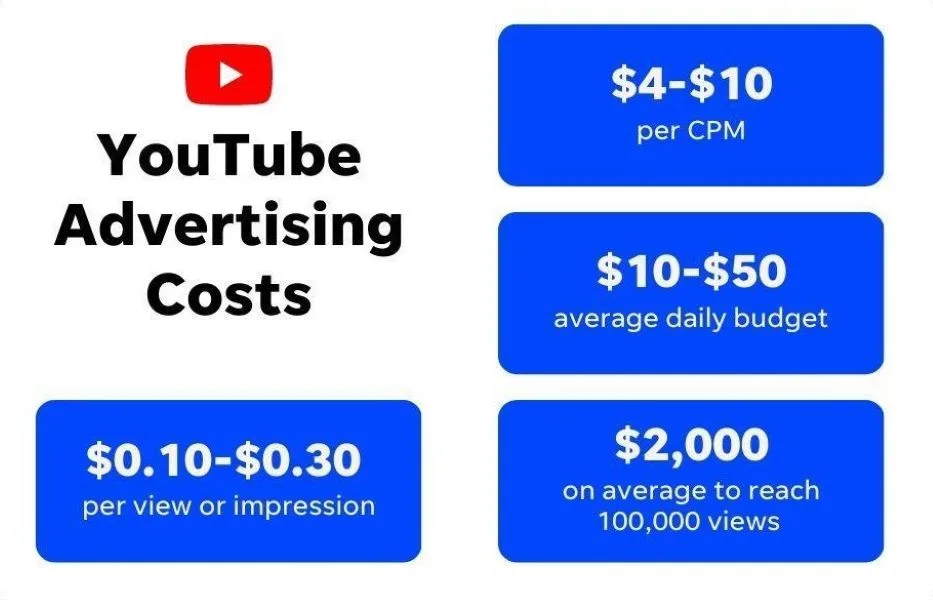
Your ad campaign’s cost will be impacted by:
- Upfront costs to produce your ad: It takes time and talent to write, film, edit, and perfect your YouTube ad! YouTube advertising partners handle production for you, which can help reduce costs.
- The types of ads you’re running: As we covered above, there are multiple ad formats out there, and they each come with different costs.
- Your campaign goals: What you want your ad to achieve will dictate choices like bidding strategy and ad format, which in turn impact costs.
- Your audience targeting: As with any PPC campaign, the cost of your advertising adjusts up or down depending on your targeting choices.
- Your daily advertising budget: When you create a campaign, you can set a daily budget. A lower limit can keep your costs in line, but it also limits your ad’s reach.
👀 What costs and results can you expect from video ads? Find out in our Display & Video Ads Benchmarks.
What makes for successful YouTube ad creative?
One of the great things about video ads is the endless creative possibilities they offer. In general, though, a successful YouTube ad often follows a three-step flow.
First, the hook
With YouTube advertising, time is of the essence. Bumper ads give you six seconds to tell your entire story. Non-skippable ads limit you to 15-30 seconds. And while skippable ads can theoretically go on for longer, you only have five seconds before the “skip” option appears.
That means your script has to open with a compelling hook—something that draws viewers in and makes it impossible to turn away. There’s a lot of room for creativity here, and once again, the hook will help grab your viewer’s attention quickly.

This ad from MUD/WTR uses an expert (its head of R&D) to hook viewers seeking trustworthy information about functional food products.
Then, the pain point
Next, it has to introduce the problem. What pain point is your audience feeling right now, and how can you show that you understand it in one or two seconds? Remember, video allows for images, sounds, and text, so there are plenty of ways to swiftly get your point across.

This YouTube ad begins by highlighting the problem of Type II diabetes.
Finally, the solution
Before the end, you’ll reveal your product or service as the solution this audience has been yearning for. Hallelujah! And, as with any good digital campaign, your ad should end with a powerful CTA (call to action) that invites viewers to take the next step with your brand.

This Grainger ad clearly explains how to solve the problem of finding the perfect part.
How to create a YouTube advertising video campaign: A step-by-step guide
As part of the Google family, YouTube ad campaigns are created and run through the Google Ads platform. That’s good news for marketers who’ve already run Google PPC campaigns. However, there are slight nuances to creating a YouTube video campaign that we’ll walk through here.
Step 1: Link your accounts
To create a YouTube ad campaign from your Google Ads platform, you need to ensure your two accounts are linked. Log in to your Google Ads account, then head to the tools and settings section, select “Link Accounts” from the dropdown, and provide the URL for your brand’s YouTube channel.
Step 1: Set your campaign goal
Once your accounts are linked, you can begin the actual campaign creation process. YouTube advertising allows you to select from one of six distinct campaign goals:
- Sales
- Leads
- Website traffic
- App promotion
- Awareness and consideration
- Local store visits and promotions
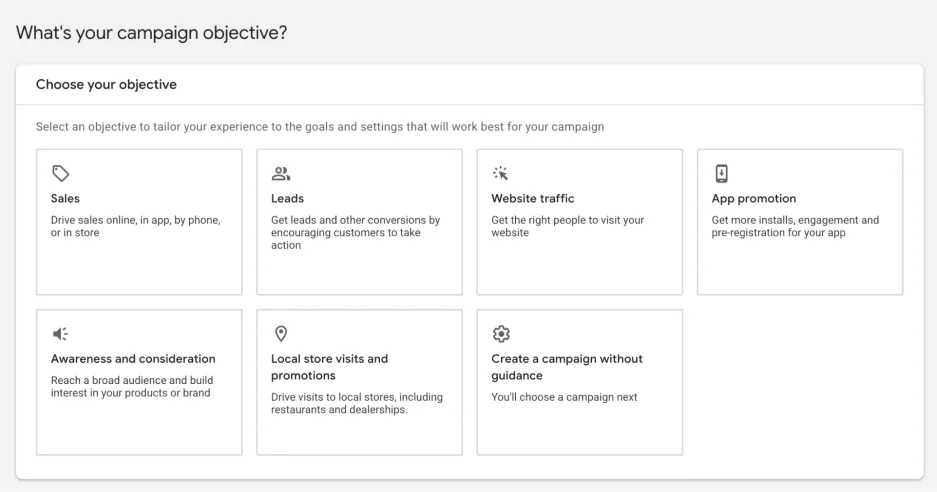
Once you’ve chosen an advertising goal, you can choose your campaign type (this is where you select video) and move on to the next step.
Step 2: Define the spending parameters for your campaign
For every YouTube advertising campaign you run, you must determine your budget and bid strategy.
Your budget is the overall amount you wish to spend on your campaign. If you pick a beginning and end date for your campaign, you can set a total budget you wish to spend. Alternatively, you may set a daily budget, which represents the average amount you wish to spend over the course of the campaign.
The other crucial piece of this step is to determine your bid strategy. Bidding dictates how your budget is spent, and Google allows you to define how you’d like to allocate your money.
YouTube ads support the following bid strategies:
- Target cost per view (CPV)
- Cost per thousand impressions (CPM)
- Cost per viewable thousand impressions (vCPM)
- Cost per acquisition (Target CPA)
- Return on ad spend (Target ROAS)
- Maximize conversions
- Maximize conversion value
Each bid strategy is tied to a different type of campaign goal, and YouTube only allows you to choose certain strategies based on the goal you identified in step 2. For example, if you opted to run a “leads” campaign, you can select from clicks or YouTube engagements as your focus. When you select clicks, you can set a budget for target cost per click, while selecting YouTube engagements allows you to set a budget for target cost per action.
This is where you’ll also set start and end dates for your campaign and determine an overall budget.
Step 3: Set up campaign targeting
As we mentioned earlier, 2.6 billion people flock to YouTube each month. Your campaign doesn’t need to reach all of them! Instead, you want to ensure your ads are seen by a relevant audience. That’s where campaign targeting comes in.
You can choose the platforms where you want your ads to appear, limiting it to just YouTube or opening it up to other video partners in Google’s wider Display Network and Google TV viewers. Then, you can select the geographies you wish your ads to run in and indicate language preferences.

Google Ads also allows for more nuanced targeting when you create your ad group. You can ensure your video is seen only by people with certain traits, buying behaviors, interests, household income, and more.
Google is known for having tremendous amounts of data on its users, so there are a lot of attributes you can use in your targeting. Be careful not to target too narrowly, or you can limit your ad’s reach and miss viewers who might find it relevant.
Step 4: Create your ads
When it comes to creating your actual ads, you can upload a video you shot and edited elsewhere, or you can head to your Google Ads asset library to create an ad with images, logos, voiceover, and branded content you’ve used before on Google Ads.
Once you’ve created a video you’re happy with, upload it to your YouTube brand account. From there, you’ll select an eligible ad format. Depending on the ad type you select, you have the option to create additional content that’s part of the parameters of a specific ad. For example, you may have space to add a headline, description, or CTA button.

When you’re pleased with all elements of the ad, click “Create campaign” to finalize the process.
If you need more detailed instructions, check out this YouTube help page.
How to track YouTube advertising performance and analyze results
Once your ads are up and running, it’s time to watch their performance. Monitoring your campaign to assess how it measures up against your goals is key to ensuring success. Plus, as with other digital advertising formats, you have the flexibility to adjust your approach and test new creative to find the most impactful combination of visuals, copy, and sound.
The KPIs you watch for will depend on your overarching strategic goals. Click-through rate isn’t always the ultimate metric. If you were running an awareness campaign, tracking views can be very informative.
For example, “Video played to” metrics provided by YouTube allow you to see how far into your video a percentage of users watch your content.

This example shows how it works by tracking a hypothetical 10 users who encountered your ad.
Google also allows you to track some video-specific metrics for YouTube ads, which can provide additional context to more standard advertising KPIs. For example, you can see how many viewers made it through part or all of your video. If you’re seeing low clicks but lots of people watching your entire ad, that’s a sign that your messaging is really capturing their attention.
Another option is to track earned actions, which include likes, shares, playlist additions, subscribers, and views. After someone’s seen your paid ad, YouTube continues to watch their behavior for the next seven days to see if they engage further with your brand. Your ad might not drive sales directly, but if it inspires people to follow your YouTube channel, that’s a signal that they find your ad helpful and relevant.
It’s time for your business to start advertising on YouTube
Now that you understand YouTube advertising 101, it’s time for you to join the legions of brands already incorporating the platform into their broader marketing strategies. You see the power video content holds with consumers, you know the basic ad formats, and you have the guide to get you started with your first campaign. All that’s left is to dream up your concept and try your hand at this dynamic digital advertising channel.
Ready to level up all of your digital advertising strategies? Contact us, and we’ll show you how our solutions can help.

Recommended for you





Unlock your business potential
We offer innovative technology and unparalleled expertise to move your business forward.