


LinkedIn Ads offers tons of different ad format options for you to reach your target audience. Single-image ads are popular, but there are many to consider—even some that aren’t available anywhere else. With all that diversity, there’s a lot you can do to stand out.
In this guide, I’ll review five of my favorite LinkedIn ad types, share some ad examples, and show how you can start leveraging them for growth in your account.
Contents
- LinkedIn Document Ads
- LinkedIn carousel ads
- LinkedIn text ads
- LinkedIn conversion ads
- LinkedIn video ads
5 LinkedIn ad types with examples
One of the strengths of advertising on LinkedIn is the variety of ad types the platform offers. Here are examples and explanations for five popular options.
1. LinkedIn Document Ads
In my opinion, LinkedIn Document Ads are likely the most underused ad format on LinkedIn.
Document Ads allow you to offer a content asset as the creative in your ads. You can do this one of two ways. First, you can let viewers download the entire asset directly from the LinkedIn ad. Here’s an example of how that works.

Second, you can leverage a lead gen form to capture a viewer’s information after a short teaser of the asset, as this example shows.

For that lead generation option (which most of my clients tend to opt for), once the user clicks on the ad, it will then direct them to a lead generation form where you can capture their information without them leaving LinkedIn.
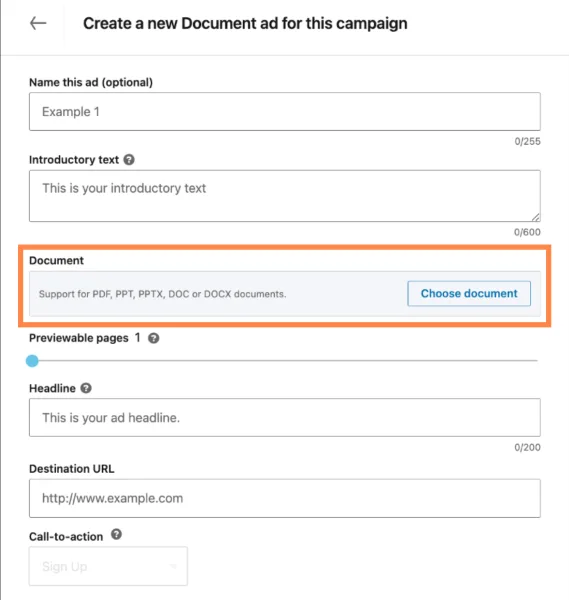
No matter which approach you take with your document, unlike other formats, Document Ads have advertisers upload the content directly to their servers, which limits friction for the user of needing to navigate to a thank you page or get an email to receive their content. It’s all right there for them.
💡 Let’s create a roadmap for your success! Download 6 Simple Steps to a Complete Small Business Marketing Plan (+Template)
Why do they work?
Document Ads can work really well for a number of reasons, but two really stand out.
Expanded selling
First, and probably most important, you let your content do the talking rather than some snippets of text and an image ad.
For brand awareness, where the document itself is ungated, that means advertisers can show off their expertise and thought leadership without having to be truncated by the ad copy requirements. If the content was worth writing 15 pages about, then (hopefully) that’s better conveyed in those actual 15 pages rather than a couple of hundred characters and a 1200 x 628 image.
Limited friction for lead gen
Second, in addition to leveraging the asset as the creative, with lead gen forms on LinkedIn, there’s no need to worry about thank you and landing pages loading on your own website. The user can simply click download, and there it is.

In this type of LinkedIn ad, a user simply clicks download and can fill out the form right on LinkedIn.
Examples, considerations, and best practices for LinkedIn Document Ads
As you can tell, Document Ads operate quite a bit differently from single-image ads. That means they require a bit of a different touch. Here are some things to keep in mind when planning to test and use Document Ads.
Consider your campaign objective
Document Ads are not available for all LinkedIn campaign objectives. They can only be used with brand awareness, website visits, engagement, lead generation, and website conversion.
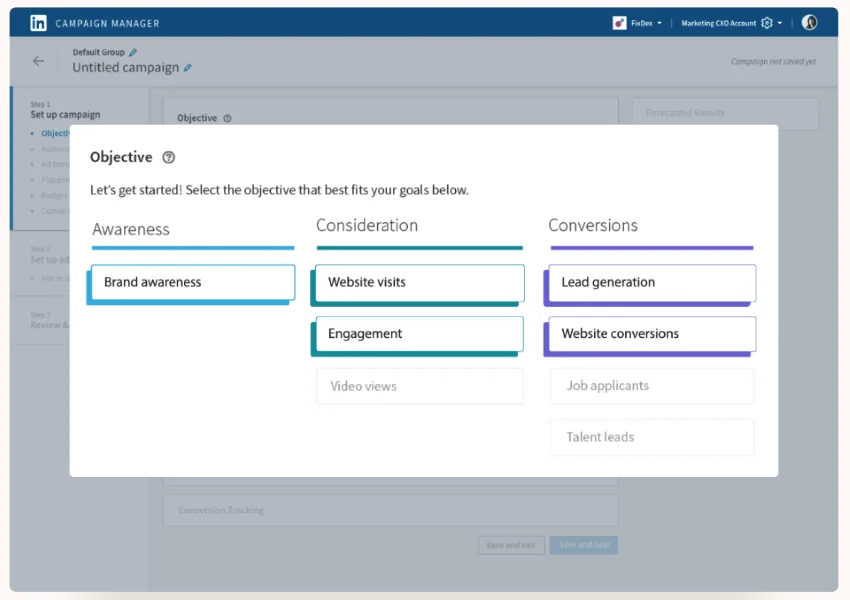
The campaign objective you select will also change what options you have for ad creation. For Brand Awareness, there are no preview pages for your document. The user will see the document in its entirety.
Lead generation is the only option that lets you use a lead generation form. All others let you have preview pages, and the user has to opt in to download the asset, but no information is gathered at that initial download.
Use the retargeting capabilities
In LinkedIn, you can build audiences based on how users engaged with a Document Ad and retarget them with precision.

Simply choose the ad format as the source, then customize your audience based on your desired list of users. I’m a fan of being able to use these lists for both inclusion in a retargeting sequence as well as exclusion from higher-level campaigns. If someone has already taken that mid-funnel action, I’d like to save my top-of-funnel dollars.

Don’t be stingy with previews
When I first discuss Document Ads with clients, they’re on board with the concept, but want to preserve their intellectual property as much as possible. This usually means taking a 20-page document and offering up only the first 2-3 pages as the preview.
While this might sound like enough, in my experience, it’s not.
Those pages typically only cover the cover page, a table of contents, and potentially an “About the Report” or “About the Author” page. There’s no real meat there.
In my campaigns, I tend to see better performance when we offer either 10-25% of the asset or whichever percentage gets the user through a complete idea. Many documents are broken into sections or chapters, and each usually carries a complete idea. So for those types of assets, I’ll likely offer up the entire first chapter/section as the preview, assuming it doesn’t take up more than maybe 30% of the document itself.
Using this amount of content really gets users interested in your asset and can help create both greater awareness of your thoughts and more qualified leads.

This LinkedIn Document Ad example offers 10 pages of real information for a viewer to scan before they decide to download the rest.
2. LinkedIn carousel ads
Carousel ads, in my opinion, are much more appealing than a single-image ad.
Instead of only having one image to convey your message to your target audience, carousel ads let you have a series of images (up to 10) to do just that.

The user can then swipe through the images you’ve added and engage with each as needed.
Why do they work?
Carousel ads can be enticing to users for many different reasons.
Expanded messaging
Just like with LinkedIn Document Ads, carousel ads give you more space to market to your audience than you have with only one creative. You can have up to 10 images in a single ad unit.
Multiple calls to action
Additionally, each of those carousel images comes with its own headlines, and you can even customize the call to action and landing page for each.

If one card talks about getting a quote, you can send the users to that page. If another teases your company’s stellar customer reviews, you can send them to a relevant page on your site. Each card can let the user choose their own path when it comes to engaging with your company.
📣 Need better CTAs? Get your copy of The 42 Best Calls to Action Phrases Ever (& Why They Work)
Examples, considerations, and best practices for LinkedIn carousel ads
Carousel ads are among the most versatile of the LinkedIn ad types. Here are some things to consider.
Be flexible with your campaign objective
Carousel ads are one of the few ad types that are compatible with all LinkedIn ad formats. No matter which objective you have for your campaigns, from hiring to client acquisition, you can use a carousel ad.
Create a unique flow for carousel ads
With the additional images and text space you have with carousel ads, don’t be afraid to get creative. Whether it’s leveraging each card as a new feature or benefit, creating one continuous scene from image to image, or showing off a series of customer reviews, this ad format can give you a lot to play with.

In this LinkedIn carousel ad example, the brand uses each image to expose an interesting tidbit about its report.
3. LinkedIn text ads
Text ads are likely the most controversial ad format I’ll have on this list, but I think they’re worthy of being in just about everyone’s account.
Text ads are the shortest and smallest ad format on LinkedIn. They consist of only a short headline, description, and a tiny image. They appear in the right-hand rail of the user interface on some pages.

Why do they work?
While text ads certainly aren’t going to make someone stop scrolling with attention-grabbing videos and imagery, they can absolutely have an impact on your LinkedIn efforts.
The best use case I’ve found for text ads on LinkedIn is for remarketing campaigns. For a warm audience who already knows you, these ads can be the little reminder that helps them across the finish line. They appear with small visuals and simple messaging, but can drive incremental leads and conversions for companies trying to nurture users.
Examples, considerations, and best practices for LinkedIn text ads
Here are a handful of things you need to keep in mind for text ads to perform well and set the right expectations.
Expect high impressions and low CTRs
Since these ads are so small and there aren’t lots of people leveraging them, you’ll likely end up with very high impression counts and very low click-through rates (CTRs). We’re talking CTRs in the 0.01-0.02% being acceptable.
You’ll see low volume, incremental conversions at a Low CPA
Because of this low CTR, you can expect pretty low conversions from these campaigns. But since costs per click (CPCs) are also low for this ad format, usually $1-$3, when someone converts, you can usually have a pretty low cost per action (CPA) as well. If you need to brush up on your CPCs, CPAs, and CTRs, this guide to marketing acronyms will help.
Small imagery means no fluff
Since the images for text ads are small, that means we can’t use imagery that we’d likely use for regular sponsored posts.
Rather than a room full of people having a discussion or a view of your user interface, you’re going to need a clear, singular focal point in your ads.
That could be a logo, an icon that relates to your business, or something else that focuses on only one thing.

Notice the simple images in this LinkedIn text ad example.
The image above is a slightly zoomed-in image of the ads from LinkedIn’s example we used above. The icon at the bottom is the clearest, and it’s only a line drawing. The middle one is okay with a focal image, but the text is kind of hard to read, even though it’s only one word.
The image at the top? This is what we likely need to avoid. It’s a dark square where you can’t really make out the image, and the text below is illegible. Don’t forget, this is only a small portion on the right side of your screen.
4. LinkedIn conversation ads
Conversation ads are one of the newer ad formats on LinkedIn and, in my opinion, are chronically underused.
I usually compare conversation ads on LinkedIn to a customizable chatbot.

This ad unit will appear in the inbox of your target audience and will send them through an interactive conversation with you or your company.

Once the user clicks to open the conversation ad, they’ll see the initial message and a series of calls to action depending on how you’ve set up your flow. From there, it’s sort of a “choose-your-own-adventure” play.
Why do they work?
Unlike most other ad formats that only really let you focus on one call to action, conversation ads allow you to create a custom flow for your audience that lets them find their way to whichever call to action works best for them.

This LinkedIn conversion ad example shows how a viewer can self-select to become a lead. Even the negative feedback is an important data point.
Depending on the type of audience you’re using, it might make sense for you to offer multiple pieces of content. Or it may make sense for you to offer a sales call rather than an online video review. Maybe there’s some combination of calls to action that works for you.
No matter the scenario, with conversation ads, you give users the option to find the CTA that works best for them through simple prompts.
Examples, considerations, and best practices for LinkedIn conversion ads
Since these ads are highly customizable, there are some things you need to plan for when going into them.
Choose the right campaign objectives
Conversation ads are not eligible for video views, job applicants, or talent leads, but all other objectives are on the table for usage.

Retarget based on engagement
Similar to the Document Ads we talked about earlier, conversation ads let you create audiences of users based on how they engaged with your conversations.

When building your audience, you can select how they engaged, how recently they engaged, and which campaigns they engaged from, giving you quite a bit of control over the specificity of your audience. These users can then be leveraged for targeting or exclusion depending on your nurture flow.
Start from scratch or use a template conversation
While LinkedIn allows you to build conversations from scratch, I can definitely see how that would be overwhelming if this is your first go-round.

Luckily, LinkedIn offers many different templates you can use to get started. Simply choose the objective you’re trying to get out of your campaigns.

Then you can fill in all of the predefined conversation points with starter messages and suggested CTAs. This makes the building flow much easier since you’re now simply customizing something to your needs rather than creating it from nothing.
Focus on one lead gen form per conversation
While you can have many calls to action throughout your Conversation Ad, you can only have one lead gen form attached to each.

You select which form you want to use on the first page of the conversation ad builder, even before you build out the conversation itself.

You can then leverage it in multiple places throughout the conversation, but for any other call to action, you’ll have to use regular landing pages.
5. LinkedIn video ads
Leveraging video in your ads definitely isn’t new, but it comes at a price both in marketing and production. Either way, if you use them correctly, they can definitely be worth the effort.
Video Ads are effectively the same thing as single-image ads in that they populate in the LinkedIn feed, but they utilize a video creative instead of a single image.

In this LinkedIn video ad example, the brand shares a fast-paced preview of its tools and capabilities that catch scrollers’ attention.
Why do they work?
Video ads are a great way for you to get your message in front of your target audience in a much more dynamic experience than with single-image ads. Video ads are more engaging and can be much more memorable than static ads if you’re able to leverage your creative in the right way.
Examples, considerations, and best practices for LinkedIn video ads
Here are some things to keep in mind about video ads to try to get the most out of your creatives.
Try the video ads campaign objective
Video Ads are eligible in all LinkedIn campaign objectives except Talent leads.
But unlike other ad formats, video ads also have their own dedicated campaign objective.

With the video views campaign objective, the creative and the goal are focused on the video itself. The creative is self-explanatory, but the campaign’s optimization goal can only be Video views or impressions. You’re still able to opt into conversion tracking, but these won’t be what the bid strategies focus on. These will just be secondary actions tracked back to your campaign.
Base your video length on your goals
You can use a video clip that’s anywhere from 3 seconds to 30 minutes, but LinkedIn recommends using only 30=second spots. Personally, I don’t categorically agree with that.
While you should absolutely stack the beginning of your video with your hook and a brand introduction, you can then use as much time as you want after that, telling your story and selling your offering in the way that works best for you.
Here’s a campaign we ran testing the length of video for an investment product. They had always run shorter ads and saw good engagement, but we wanted to test longer form creative that was able to dive into the details much more.

While the shorter video certainly had better engagement and view rates, the longer form creatives ended up contributing to conversions. If we were simply shooting for brand awareness, the shorter variants would likely work best. But for those trying to create a closer tie with the target audience and potentially see conversions down the line, a longer format, still with a strong hook at the front, might yield better results.

This promoted LinkedIn video is only 16 seconds long, but it teases a fun conversation viewers will want to continue.
Don’t forget retargeting for video ads
This is likely feeling a little repetitive at this point, but video ads also let you retarget based on your target audience’s viewing behavior.

For these, you can choose what percentage of your video they watched, how long ago they watched it (up to 90 days), and from which campaigns they watched it.
Choose the right LinkedIn ad type for your goals
While there are many more ad formats on LinkedIn, these are the options I see with good performance that most advertisers aren’t using or are a little afraid to set up. Hopefully, this rundown has given you a little better understanding of what these formats are, how they work, and what you can do to see success with them.
If you’d like some help boosting the performance of all your digital marketing initiatives, contact us, and we’ll show you how our solutions can support your goals.

Recommended for you





Unlock your business potential
We offer innovative technology and unparalleled expertise to move your business forward.