


TikTok boasts 135 million users in the US, and its growing success continues to influence the social media landscape as a whole. Other platforms have rushed to replicate its short-form video content and attention-grabbing algorithm.
And it is once again leading the social media pack with the introduction of TikTok Shop. Launched in the US in 2023, the feature allows brands to sell directly on TikTok—no need to drive consumers to your website or a third-party seller. They simply see something they like, click “buy,” and have it on their doorstep within days. Yes, other social platforms have incorporated shopping features, but few are as seamless as TikTok Shop.
As any brand that sells online knows, reducing friction in the buying process is key to winning sales, and it doesn’t get much smoother than the TikTok Shop experience. Curious about how to sell on TikTok Shop and what adopting this selling channel could do for your brand? Read on.
Contents
- What is TikTok Shop?
- Who should sell on TikTok Shop?
- The step-by-step guide for getting started on TikTok Shop
- How much does it cost to sell on TikTok Shop?
- How to promote your TikTok Shop
- Tips for succeeding as a TikTok Shop seller
What is TikTok Shop?
TikTok Shop is the social media giant’s marketplace that’s totally native to the app. When you set up your TikTok Shop, you can manage the entire selling process from the TikTok Shop Seller dashboard. List products, create content to promote them, and receive and fulfill orders all from your Shop (or connect it to your existing ecommerce platform).
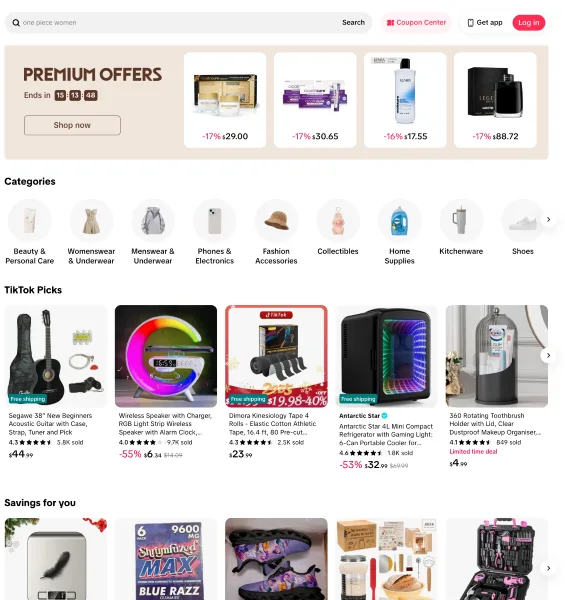
TikTok Shop makes buying similarly simple for consumers. When they see a product they like while scrolling on the app, they can buy it directly with their digital wallet. No need to click out to another website and enter credit card information—the purchasing experience is completely seamless.
💡Don’t go in without a plan! Download 6 Simple Steps to a Complete Small Business Marketing Plan (+Template)
Who should sell on TikTok Shop?
Is TikTok Shop a fit for your business? If you sell any sort of product, whether digital or physical, the answer may be yes.
To further assess the fit for your brand, consider your target audience. Is TikTok an app where they congregate? While TikTok tends to skew younger, demographics on the platform are shifting. One-third of all US adults say they’re on the app, yet 52% have never posted a video. So while your audience might not be sharing about themselves, they’re watching what others are posting.
If your business already has a presence on the app, it’s simple to start selling there. You can connect product listings to existing organic content to promote your items, so those discovering your videos can buy from you.
Another factor to consider is the power of the TikTok algorithm. It’s incredibly good at dialing into what a user wants to see and serving them relevant content. When you sell on TikTok, you’re harnessing the power of that algorithm to get discovered by a new audience.
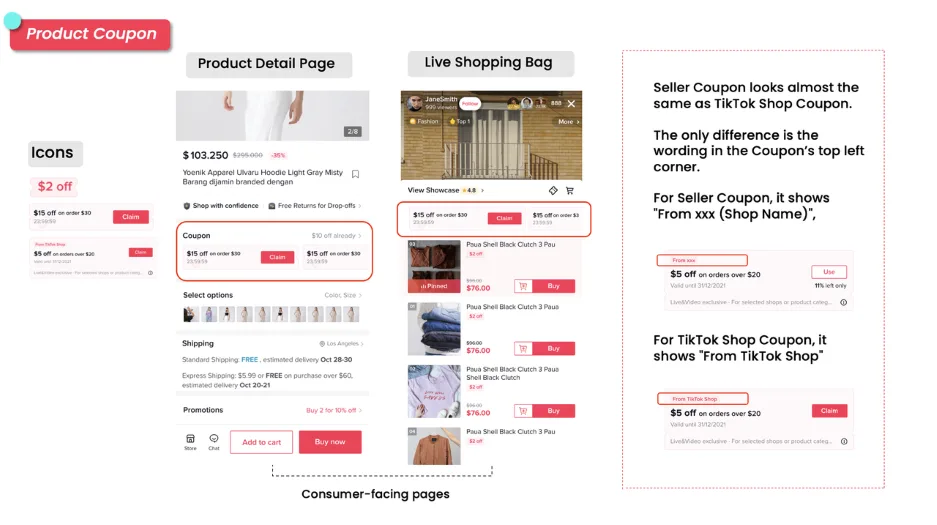
An example of a TikTok Shop coupon offered through the TikTok-funded promotions program.
And if you think TikTok Shop might be a fit for your business, now’s a great time to try it. As TikTok is still actively promoting the Shop feature on the app, TikTok funds promotions for brands at no cost to you. They run promotions during busy shopping seasons (like Black Friday) and offer product discounts and incentives to drive activity on the platform. Here are more TikTok stats to review as you consider the question.
The step-by-step guide to getting started on TikTok Shop
If you think selling on TikTok is right for your brand, this will walk you through the entire process, from establishing your account to fulfilling orders and dazzling customers.
1. Create your account in the TikTok Seller Center
To sell on TikTok, you need to set up your Seller Center account. If you’re new to the platform, you can create a brand new business account. Or, if your brand already has a presence on TikTok, log in using your existing account credentials.
Once you’re logged in, you’ll need to verify your business information. TikTok will review copies of your business registration documents, which usually takes a day or two.
2. Set up your Seller Center account
Before you start listing products, get your store ready to receive orders and collect payment.
If you already have an ecommerce platform you use to manage the rest of your online sales, you can connect it to TikTok to streamline your order management. TikTok integrates with most of the major platforms, including Shopify, Ecwid, WooCommerce, and BigCommerce. If TikTok Shop is your first foray into ecommerce, you can manage all incoming orders from your TikTok Seller Center.
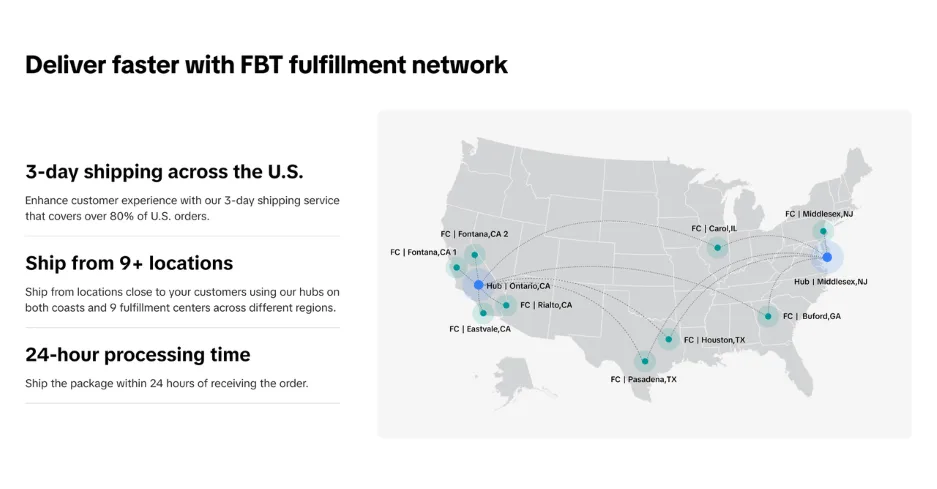
Fulfilled by TikTok offers those who don’t already have a fulfillment partner access to fast processing and shipping.
The next thing to tackle is order fulfillment. Fulfilled by TikTok is the app’s own fulfillment solution, which brands can use to handle storage, packing, and shipping (at a cost). If you already have a fulfillment partner for your other ecommerce channels, you can use them here. And if you integrate your TikTok Shop with your existing ecommerce platform, that’s easy. Or, you can choose to fulfill orders yourself—just be mindful that TikTok rewards brands with fast shipping, so staying on top of your orders will be key.
Finally, input your business bank account information. Any sales that happen on the platform will be paid out by TikTok to you on a weekly or bi-weekly schedule, so they’ll need your bank account information to process those payments.
3. List your products
The next step is to list your products. TikTok has a form to generate for each product listing, which asks for a title, description, images, and sales-related information like the product price and shipping details.
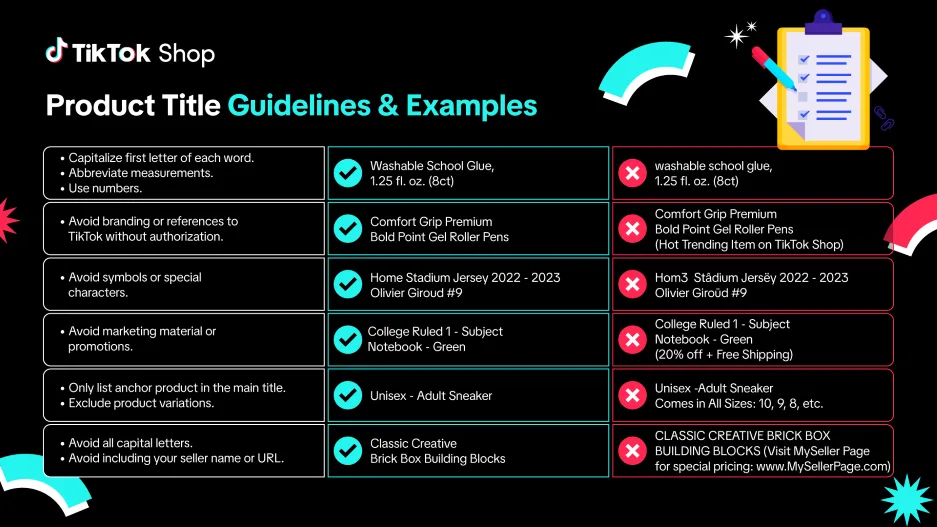
TikTok offers tons of guidance on shop listing best practices on its seller help center, TikTok Shop Academy.
Go through and complete the listing, including as many details as you can. TikTok tends to reward products with descriptive titles and details that make it easy for a prospective shopper to understand what they’re buying, so take the time to optimize your listing.
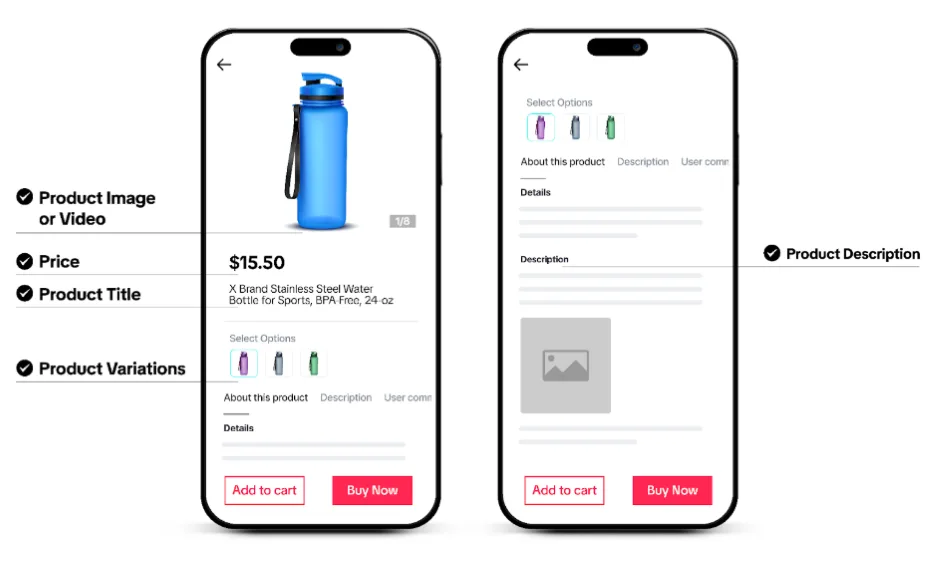
The more details, the better! TikTok likes to see product details and clear images.
Pro tip: TikTok also offers a product optimizer tool, which provides suggestions for strengthening your listings. It might prompt you to take steps like adding more photos or adjusting the copy. Take advantage of this feature!
When you’re done with each listing, you’ll be prompted to submit it for review. TikTok will ensure your product description is accurate and your offering is one you’re allowed to sell on the platform.
4. Link approved products to your content
If you have a TikTok profile for your business, chances are some of the products you’re going to sell via TikTok Shop have already been featured on your page.
Once your product listings start to go live, you can link them to those existing videos and images. When you do, viewers will have the option to click on the shopping icon and purchase straight from there.
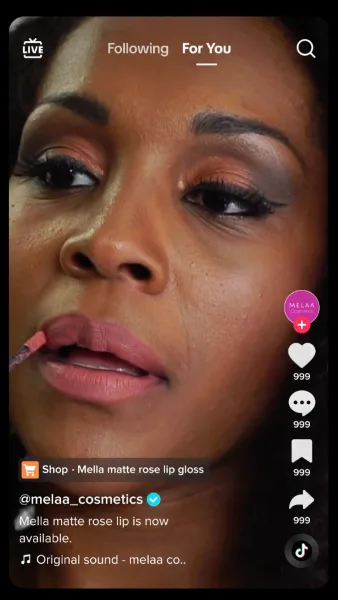
Clicking on the shopping cart icon drives viewers to the TikTok Shop listing for the lip product shown in this video.
You can also share product listings elsewhere on TikTok. Consider pinning the listing for your hero product in your TikTok bio, so anyone visiting your brand page sees it right away. Or you can try TikTok Live and feature products during your livestream.
5. Manage and fulfill incoming orders
How you manage and fulfill incoming orders will depend on your TikTok Shop setup. If you’ve integrated your TikTok Shop with your existing ecommerce platform, all TikTok orders should appear alongside orders coming from your website or other online platforms.
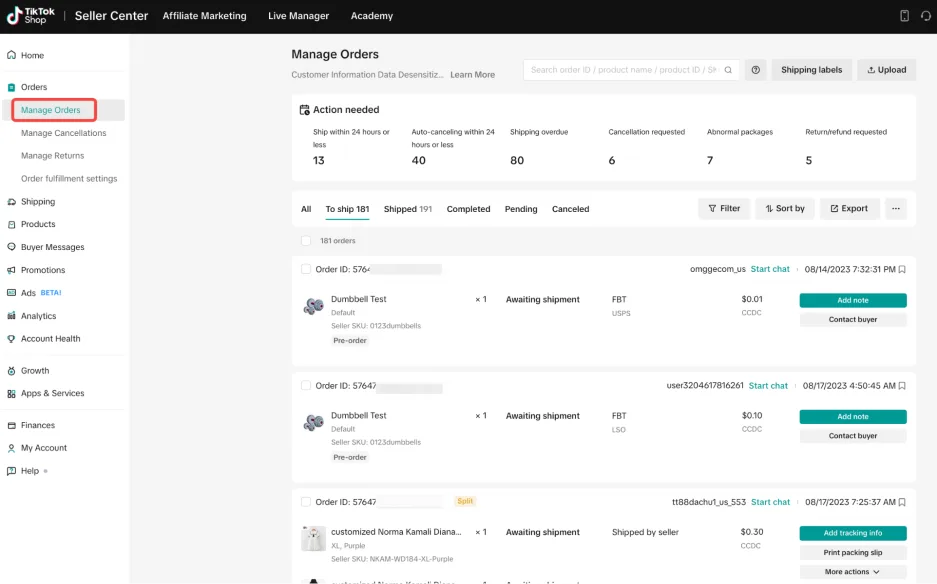
If you’ve chosen to manage incoming orders directly through TikTok, you’ll find details about purchases in the “Orders” tab of your TikTok Seller Center. You’ll be able to see all relevant purchaser information, like name, shipping address, and payment status. This is also where you’ll go to see and reply to any incoming customer questions.
6. Strengthen your TikTok Shop with responsiveness and reviews
TikTok wants to connect its app users with high-quality shops. That’s why it’s important for you to hit all your marks as a seller and build up trust signals on the app.
🌟 Free resource >> How to Get More Reviews: 8 Tips to Boost Ranking, Reputation, & Revenue
TikTok rewards sellers who quickly ship orders, address buyer questions, and are otherwise responsive. When you maintain a well-run TikTok Shop, you’re more likely to appear in search results to other consumers.

Reviews can help build trust in your products.
Building up customer reviews is also a vital part of strengthening your TikTok Shop’s profile. Reach out to customers who’ve bought from you to ask for a review. As you amass more positive feedback, prospective buyers will feel a greater sense of trust in your brand.
How much does it cost to sell on TikTok Shop?
One of the major benefits of TikTok Shop for sellers is that it’s completely free to register for the TikTok Seller Center, and there’s no up-front fee for listing your products. When you do start selling items, TikTok takes a small commission on each sale.
If you wish to put some advertising dollars behind your TikTok Shop, you can run promotions on your products or spend on advertising, or invest in influencer partnerships, all of which you can manage from your TikTok Seller Center dashboard.
How to promote your TikTok Shop
Once your TikTok Shop is up and running, you can try some paid tactics to get the word out about your products. There are a handful of options available to sellers, all of which can be found in the Seller Center. You can:
- Run ads: Like other online marketplaces, TikTok allows you to run ads for your shop on the app. It offers a variety of ad types, all of which are designed to promote your Shop and ultimately drive traffic and sales. TikTok also offers retargeting advertising options, which put your brand in front of users who have interacted with your Shop in the past.
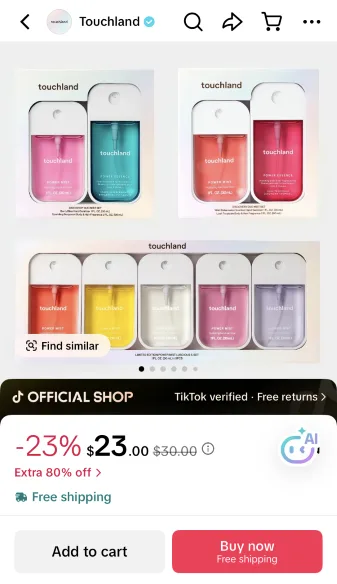
- Run promotions: TikTok allows you to run deals in your shop that incentivize purchases. You can create a discount, offer free shipping, launch “buy more/save more” offers, and more. TikTok also offers a funded promotions program, where your shop can opt into broader promotions run on the app, and TikTok will cover all or part of the costs.
- Create affiliate partnerships: Influencer marketing is big on TikTok. Your Seller Center gives you an easy way to connect with relevant influencers on the platform and give them an opportunity to try (and tout) your product. When their content drives sales, they receive a small commission.
Tips for succeeding as a TikTok Shop seller
Success on TikTok Shop is inextricably linked with success on the broader TikTok platform. So understanding how the algorithm works is essential. TikTok weighs each user’s watch time when curating their content feed. The app tracks how long they engage with each piece of content, and serves up similar stuff in the future. This differs from other social platforms, which tend to show users videos from accounts they follow or things that were posted recently.
To signal relevance to TikTok:
- Optimize your captions with keywords and trending hashtags: While TikTok is a video platform first, the text that accompanies those videos helps the algorithm understand the content and get it in front of the right people.
- Create content that’s native to the platform: TikTok rewards content that looks like it’s made for TikTok. Instead of repurposing product videos from your website, create videos that lean into trends or styles that are popular on the app. Incorporate trending audio, make your video one to duet or stitch, or create influencer-style content (like “get ready with me” or unboxing videos).
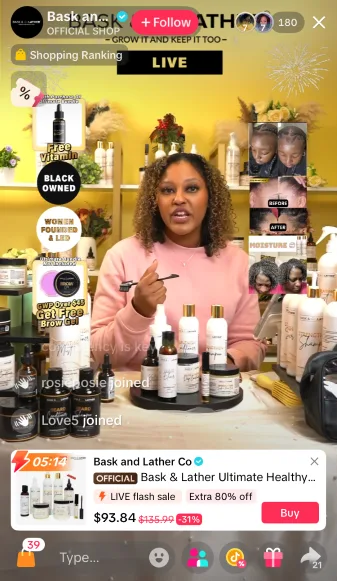
- Try TikTok Live shopping: Remember the good old days of QVC? They’re back and reimagined for the digital era. Go live with your brand on TikTok and walk people through the items you have for sale in your Shop.
- Post content regularly: Another thing the TikTok algorithm likes to reward is consistent activity on the app. Set a cadence for posting new videos and stick to it to see results. Ideally, you’re sharing three to five pieces of content each week.
- Be a good Shop owner: TikTok also rewards active sellers with fast shipping times and strong customer reviews. Put a framework in place to run your shop successfully, and invest in the right tools behind the scenes (an ecommerce platform, good fulfillment partner, or internal workflow, etc.).
The clock is ticking on setting up your TikTok Shop
TikTok Shop is still relatively new—the platform only launched in the US in September 2023. Those who get onto the platform right now are still early adopters, and there may be upside to being one of the first brands onto a new platform. Plus, TikTok offers sellers incentives to join, from TikTok-funded promotions to the discoverability its algorithm creates.
Now is a great time to consider getting started with TikTok Shop, even if you launch with a limited number of products as a test run. Take time to explore the platform, make the most of its features, and you may just find a way to turn it into a successful sales channel for your brand.
Did you know LocaliQ is a TikTok Marketing Partner? Learn more here, and then let’s talk!
Get more TikTok marketing tips here
- How to Delete TikTok Videos Fast in 5 Easy Steps (with Screenshots)
- 100+ Copy & Paste TikTok Bio Ideas to Power Up Your Profile (With Examples)
- How to Edit TikTok Videos Like a Pro: 21 Ideas to Try
- What Is the FYP on TikTok? (+5 Ways to Get Your Videos There Fast!)
- 225+ TikTok Hashtags for Better Discoverability
- TikTok SEO Strategies to Maximize Your Reach

Recommended for you





Unlock your business potential
We offer innovative technology and unparalleled expertise to move your business forward.