

One of the best outcomes of the AI boom is that it’s helping small and local businesses get results that used to be out of reach. Now, a business owner or one-person marketing team can pull customer insights from across the web, create a high-converting email sequence customized to each lead, and spin up a unique cost calculator that helps qualify prospects fast.
The new challenge is figuring out where to use this incredibly powerful and versatile tool.
In this guide, we’ve detailed 35 ways to use AI in marketing for social media, paid advertising, and more. These aren’t generic ideas like “use it to write captions.” Each idea shows how to use AI for a specific marketing task so you can get results right now.
35 ways to use AI in marketing for:
- Social media
- Local SEO
- Your website
- Reviews and reputation
- Email and SMS
- Paid ads
- Customer communications
- Tips for using AI in marketing
How to use AI for social media
Social media works best when you post what your audience actually responds to. These ideas help you learn from competitors, your own past content, and online conversations so each post has a better shot at engaging your ideal audience.
Analyze competitors’ top-performing posts
Pick three to five competitors, including a couple outside your area that are great at social. Screenshot their 10 most-engaged posts from the last few months and upload them to AI. Ask: “Categorize these by topic, format, and opening hook. What patterns show up in the posts with the most comments? Suggest 10 ideas for my business that use those patterns but cover topics they’re missing.”

Find businesses in your niche and feed their best-performing posts to AI.
Begin testing a few each week. Keep track of which work for your unique audience.
👋 Want more? Here’s 14 No-Brainer Ways to Use AI for Social Media (+20 Prompts)
Find themes in your most successful content
Export six to 12 months of post data from Meta Business Suite or your platform’s analytics. Upload the file to AI and ask: “Compare my top 10 posts to my bottom 10 by engagement rate. What’s different about topic, format, length, posting time, and whether people appear in the photo?”
Turn the answers into three simple rules, like “Show the team” or “Lead with a question.” Use those conclusions to guide future social posts, whether you write them or have help from AI.
Quickly repurpose larger assets into social posts
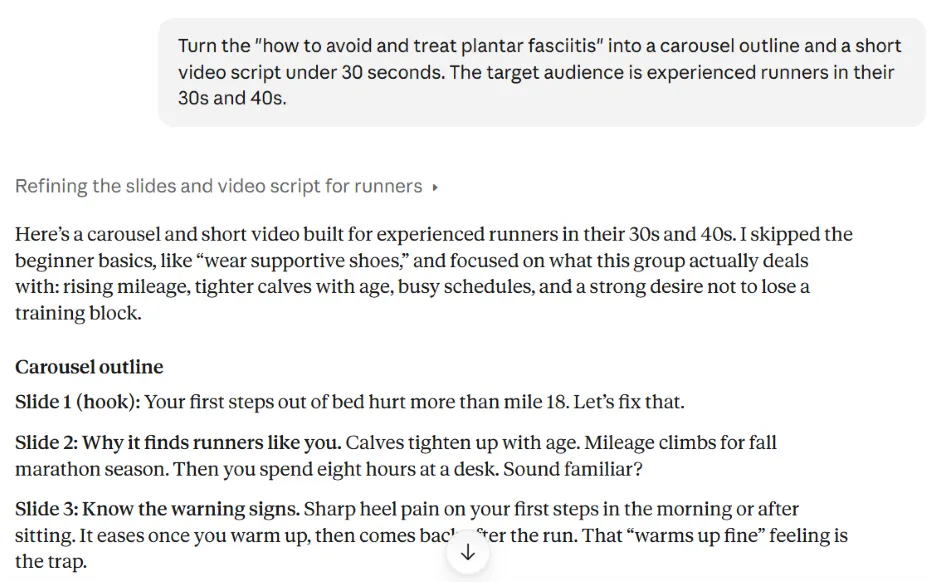
Pick one bigger piece of content, like a blog post, video, workshop recording, or newsletter. Upload it to AI with three of your best past posts as voice examples. Ask: “Turn this into a carousel outline, two short video scripts under 30 seconds, a Facebook post, and a Google Business Profile post. Use a different takeaway for each.”
Edit, then spread the new posts across the next two weeks so one asset covers two weeks of posts.
Turn customer projects into engaging posts
Pick a project (or product) with a clear before and after, then gather photos, short video clips, and the customer’s review. Upload them to AI and ask: “Write a five-slide carousel that tells this story: the problem, what we did, the result, and a call to action. Then write a 20-second video script with on-screen text.”

Use AI to turn basic before-and-after images and posts into engaging social content like videos and carousels.
Get the customer’s okay before sharing, and ask if you can tag them. Their social media network may be your next customers.
Dig into Reddit and other online forums for insights
Ask an AI tool with web search, like Perplexity or ChatGPT, to “Find Reddit and forum threads from the past year where people in [city] ask about [service]. Summarize their top questions, frustrations, and the businesses they recommend. Include links.”
Click through to confirm the threads are real and recent. Turn the most compelling questions and frustrations into selling points. Facebook groups and Nextdoor are mostly private, so you’ll have to copy and paste those yourself.
Build a content calendar around local and relevant events
Ask an AI tool with web search: “List events, festivals, school breaks, sports seasons, and weather shifts in [city] for the next three months.” Then: “For each, suggest a post idea that connects to my [services]. Skip anything that’s a stretch.”
Check dates on official event sites before scheduling. Plan promotions two to three weeks ahead of big local moments, like back-to-school or the holiday festivities.
How to use AI for local SEO
When nearby customers search for what you offer, your Google Business Profile and website need to give them (and AI search platforms) clear reasons to pick you. These ideas help you find the gaps and fill them with details only your business has.
Find gaps in your Google Business Profile
Search your main service and city, then screenshot the top three Google Maps profiles, plus your own. Upload them to ChatGPT, Claude, or Gemini and ask: “Compare these profiles. What do competitors include that I’m missing? Look at categories, services, description, photos, review count, and how recently they posted.”
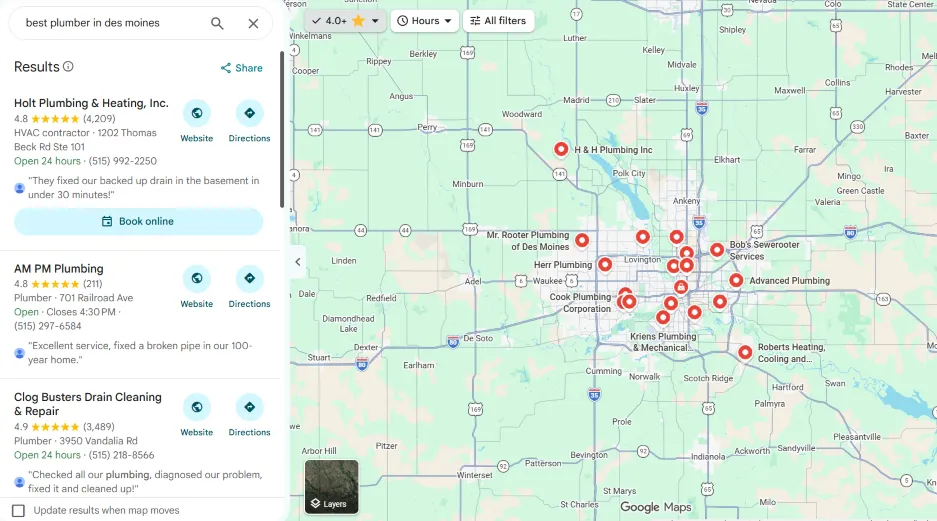
AI can help you improve your local SEO by analyzing your competitors’ Google Maps listings.
Fix the easy gaps in your Google Business Profile (GBP) first, like missing services or an outdated description. Then set a reminder to repeat this every quarter.
Turn common questions into FAQs
Export recent customer emails, contact form submissions, and chat logs (plus the complaints from your review analysis if you did that). If you record calls (wth permission, of course), add the transcripts. Ask AI: “List every question customers asked, combine duplicates, and rank them by how often they come up.”
Next, have it draft answers that lead with a direct one-sentence response, then edit for accuracy. Add the top questions to the matching service pages as well as your FAQ page. Bonus: direct answers like these are also easier for AI search tools to quote in recommendations.
Create specific service-area pages
For each town you serve, collect real details like jobs you’ve done there, common local issues (like older homes or hard water), neighborhoods, and reviews from customers in that area. Paste them into AI and ask: “Write a service page for [service] in [town] using only these details. Flag anywhere you need more information.”
Start with the three to five highest-value services or products you sell. Add a local project photo before publishing. Pages with this level of real-life details build trust with both buyers and AI search platforms.
Analyze AI search mentions
Ask ChatGPT, Gemini, Perplexity, and Google’s AI Mode the questions your customers would, like “best [service] in [city]” or “who offers emergency [service] near [neighborhood].” Note who gets named and which sources get cited. Then ask: “Why did you recommend these businesses?”
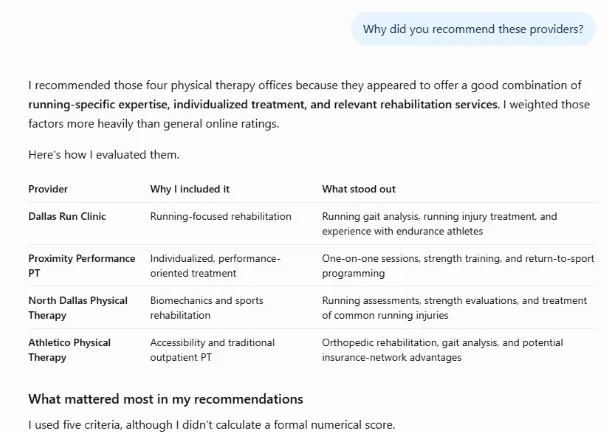
If competitors show up on Yelp, local best-of lists, or directories where you don’t, start there. Recheck this one regularly and track results in a simple spreadsheet.
Bonus: Ask the AI search platform where it WOULD recommend your business (and who for).
Turn real-world experience into Google Business Profile posts
After each job, have your team snap a before-and-after photo and record a 30-second voice memo. Include things like what the problem was, how they fixed it, and the neighborhood.
Paste the transcript into AI and ask: “Turn this into a Google Business Profile post under 100 words. Lead with the customer’s problem and end with a clear call to action.” Add the photo and post weekly. Leave out customer names and exact addresses.
Test SEO content outlines
Before you write a blog post or service page, paste your outline into AI, plus links to the top three Google results for your keyword. Ask: “What do these pages cover that my outline misses? What would a [customer type] still have questions about after reading this?” Note that some websites don’t allow AI to crawl them. In those cases, copy and paste the whole post into your AI tool.
Add the gaps that matter to your customers. Then ask what you could include that none of them have, like local pricing ranges or your own project photos.
Copywriter’s note: Using AI to create posts from scratch leaves you with forgettable, average content. Instead, use it to identify ways to make your content unique.
🛑 Want to be more visible in AI search answers? Download The Complete AI Search Toolkit: Practical Strategies to Get Found by AI
How to use AI for a better website
Your website is where interested visitors decide whether to call, book, or keep shopping. Use these ideas to see your site through a customer’s eyes and fix the things that make people leave.
Find gaps in your homepage
Screenshot your homepage on desktop and mobile and upload both to AI. Give it a role: “You’re a [customer type] in [city] who needs [service] this week.” Then ask: “After five seconds, can you tell what we do, where, and why to pick us? What would make you leave? What’s missing before you’d call?”

AI can take a screenshot of your website pages and help find ways to improve them.
Fix the top three issues first. Start with mobile since that’s how many local customers find you. Address contact issues quickly, too (you don’t want to lose customers because they didn’t know how to request a quote).
Important note: Use a screenshot here instead of giving AI your URL. AI mostly reads text from a URL. You want it to see what customers see, including the layout, a hero image that takes half the screen, and buried phone numbers.
Quickly build landing page variations for different customer types
Pick your highest-value service page and list two or three customer types, plus what each cares about most. A landlord might want fast turnaround and simple invoicing, while a homeowner wants trust and fair pricing.
Paste the page and your notes into AI and ask: “Rewrite the headline, intro, and call to action for each customer type. Keep the facts the same.” Send each audience’s ads and emails to its matching version, then compare results.
Create and build-in useful tools for customers
Give our customers something AI can’t easily replicate. Namely, useful tools built on your pricing, services, and expertise. For example, ask Claude or ChatGPT to build a simple cost estimator or a “which service do I need?” quiz.
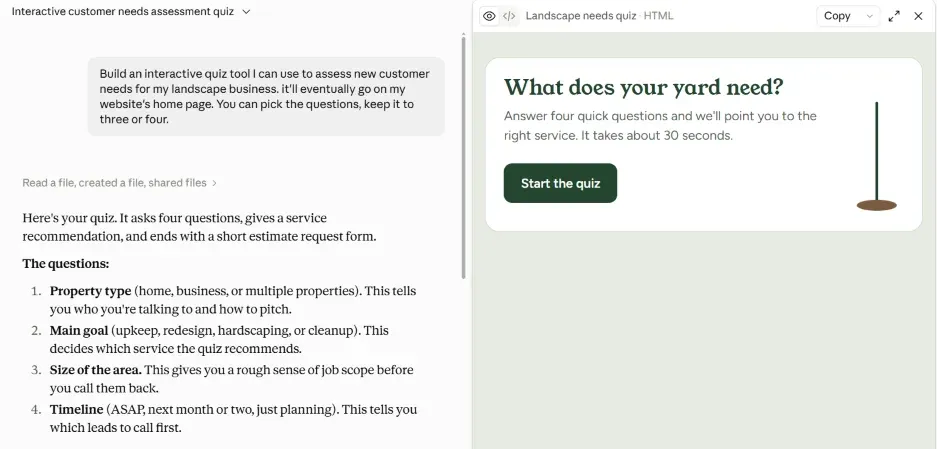
Vibe coding lets you create useful apps and tools without writing computer code.
Start with a low-stakes page and test it on your phone before launching. Then link to it from your homepage, service pages, and Google Business Profile posts. Also, avoid using these tools to collect any identifiable or sensitive personal information. For anything like that, work with a developer who can include data security measures.
Analyze chat transcripts to learn why leads don’t buy
Export 30 to 50 conversation leads who didn’t book had with the chat feature on your site, plus a handful that did. Remove names and contact details first. Ask AI: “Where do these conversations stall? Group the reasons by theme, like price, timing, slow replies, or missing information, and compare them to the ones that booked.”
Then fix what you control, whether that’s adding price ranges to your site or answering faster after hours.
How to use AI for reviews and reputation
Your reviews are free market research, full of the words customers use, what they love, and what frustrates them (about you and your competitors!). AI can sort through all of it in minutes so you can sharpen both your marketing and your service.
Mine reviews for better marketing copy
Ask an AI tool with web search, like Gemini or ChatGPT, to find and summarize your reviews across Google, Yelp, and Facebook. Or if you don’t have access to that capability, paste them in yourself.
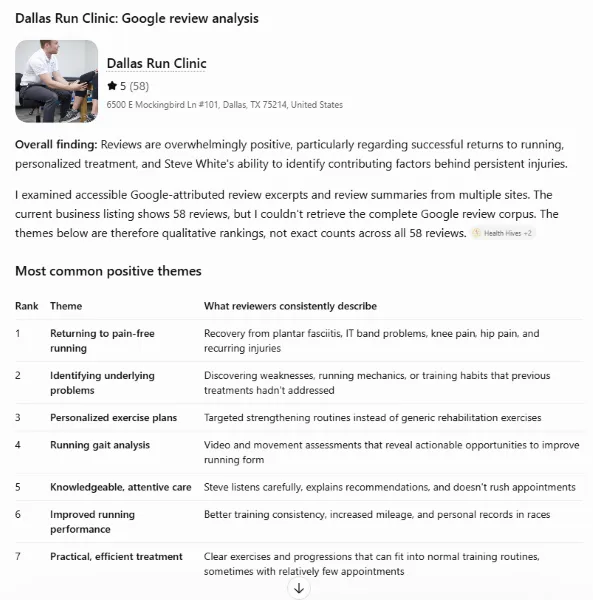
Then ask: “What are the 10 phrases customers use most when praising us, and the 5 most common complaints?” Use the praise to rewrite your headlines and service pages in customers’ own words. Use the complaints to spot doubts your website should answer upfront.
Turn competitors’ bad reviews into selling points
Search your main service in Google Maps and note the top three competitors. Ask Gemini or ChatGPT to pull their 1- and 2-star reviews, then prompt: “Group these complaints by theme and rank them by how often they come up.”
Look for problems you already solve, like missed callbacks or surprise fees. Turn each into a specific promise, such as “Upfront pricing before any work starts,” and feature it in your ads and homepage. No need to name names here. Just use their negative feedback as your strengths.
Spot repeat complaints for improved service
Pull the last six to 12 months of reviews, plus survey responses or customer emails if you have them. Ask AI: “Group the complaints by theme and break them down by location, day of the week, and service. Flag any issue that shows up three or more times.”
Share the patterns with your managers and fix the root cause, whether that’s Saturday staffing or slow quotes. Recheck in 90 days to see if complaints drop.
Draft more specific review replies
Set up a ChatGPT Project, Claude Project, or Gemini Gem with your business details, tone, sign-off, and a few rules, like “Never discuss refunds publicly” and “Move complaints offline with our phone number.” Then paste in each review and ask for a reply under 60 words that references one specific detail the customer mentioned.
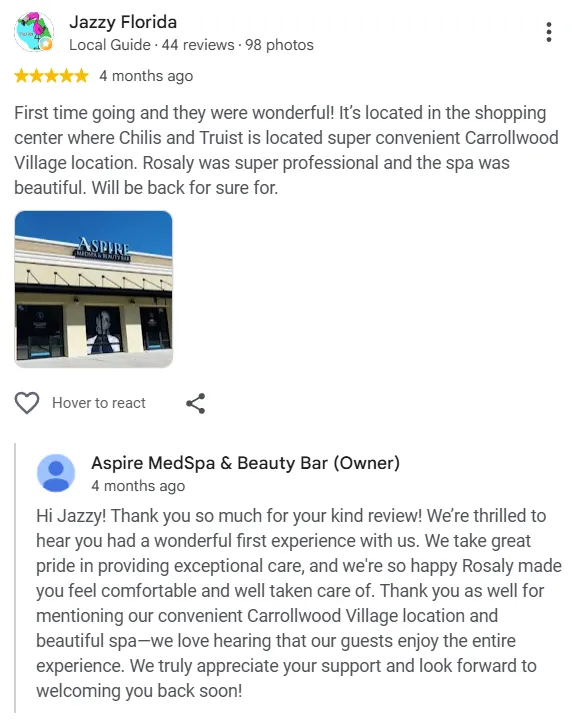
Use AI to speed up review replies.
Where it fits naturally, include the service and neighborhood for an SEO and GEO boost. Read it before posting to make sure it sounds like you.
Create a testimonial library
Gather your 4- and 5-star reviews and paste them into an AI tool. Ask it to build a table with columns for service, location, theme (like speed, price, or friendliness), and the strongest one or two sentences from each review.
Then, save it as a spreadsheet. Next time you build a service page, ad, or quote follow-up, filter for a matching testimonial. Use customers’ exact words for transparency.
How to use AI for email and SMS
Email and text reach people who already know you, which makes them some of your most cost-effective ways to win repeat business. AI helps you tailor and time each message without hours of manual work.
Segment customers by service date and schedule reminders
Export your customer list with service type and last service date (or purchase date for products). Swap names for customer IDs before uploading to AI for privacy. Ask: “Group these by when they’re due again, using these intervals: [haircuts every six weeks, furnace tune-ups every 12 months]. Then write a short reminder email and text for each group.”
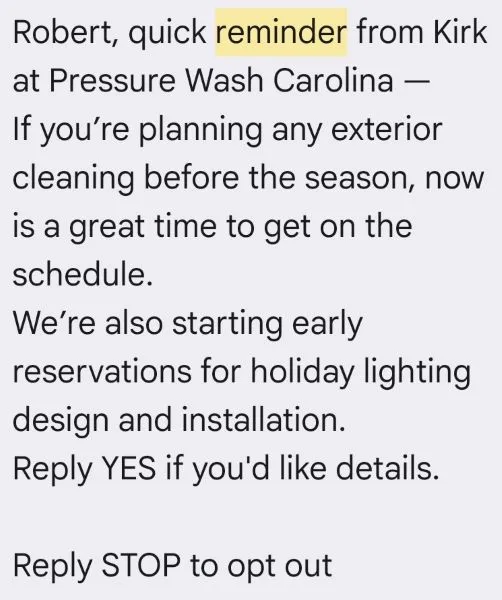
AI can help you create personalized reminders for your different customer segments.
Load the groups and messages into your email or SMS tool as automations. Only text customers who’ve opted in.
Summarize recent customer work into a newsletter
At the end of each month, gather what you already made: Google Business Profile posts, social posts, project photos, and new reviews. Paste it all into AI (or have it review the files) and ask: “Turn this into a newsletter under 300 words with three project highlights, one customer review, a seasonal tip, and one call to action. Give me five subject lines.”
Pick a subject line that catches attention and add your own personality to it. Then add some photos, send, and track. This is a great way to send social proof that builds trust and keeps prospects engaged during long buying cycles.
Personalize email marketing campaigns
Go beyond “Hi [First Name].” Pick two or three groups from your email list, like first-time customers, regulars, and commercial accounts. Give AI your next campaign and ask: “Write a version for each group. Change the subject line, opening, and featured offer to fit what each group cares about.”
Send each version to its matching segment in your email tool. Compare click rates and replies, then keep what works.
Use AI to prioritize and track incoming messages
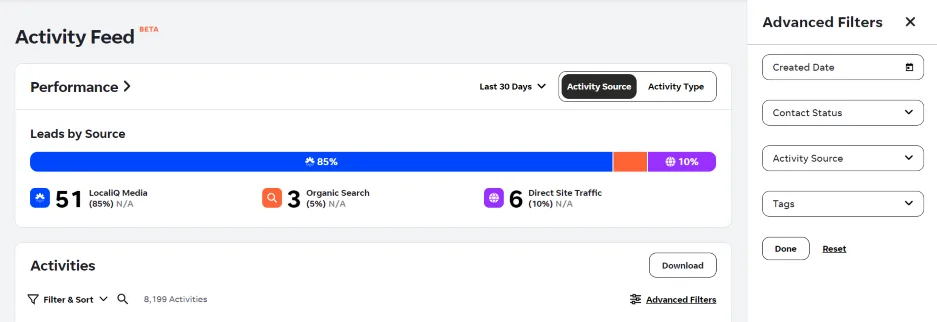
Connect your inbox, website form, and Facebook messages to an automation tool like Zapier. Have AI label each new message: “Hot lead, quote request, customer issue, or low priority. Flag anything urgent, like ‘leak,’ ‘today,’ or ‘cancel.’” Send hot leads to your phone right away, and log everything else in a shared spreadsheet with a reply-by time. End each day with an AI summary of what’s still waiting so nothing slips through.
An easier way to handle this is with a dedicated lead-management tool like LocaliQ’s Dash. It will summarize incoming calls, texts, and emails so you can quickly tell which need urgent answers and which are okay to follow up later.
Automate a “Thank you” and referral ask for every 5-star review
When a 5-star review comes in, have AI draft a thank-you that mentions a detail from the review, plus a referral ask: “Know a neighbor who needs [service]? Send them our way.”
Match the reviewer to contact details in your customer management database and send the request via email. If you offer a referral reward, make sure you tie it to the referral and not the reward. You don’t want it to look like you’re paying for reviews.
How to use AI for paid ads
Every wasted click comes out of your budget, so small improvements in copy and targeting add up. These ideas help you cut waste, sharpen your message, and keep tabs on what competitors are offering.
Scan your search terms report for wasted spend
Download the last 90 days of your Google Ads search terms report and upload it to AI. Ask: “Flag terms that spent money without converting, mention places we don’t serve, or signal the wrong intent, like ‘jobs,’ ‘DIY,’ or ‘free.’ Group suggested negative keywords by theme.”
Review the list before adding anything, since some terms may drive phone calls your tracking misses. Put this on your calendar to repeat monthly.
Turn review language into ad copy
Grab the top praise phrases from your review analysis or testimonial library. Ask AI: “Write 15 Google Ads headlines under 30 characters and four descriptions under 90 characters using these phrases. Keep the customers’ wording where you can.”

Use AI to learn which words work best in ad copy.
For Facebook and Instagram, try a short review quote as your primary text. Run the new versions alongside your current ads for a few weeks, then keep whichever brings in more leads.
Track competitor ads in Meta’s library
Search your top competitors in Meta’s Ad Library, which shows the active ads they’re running on Facebook and Instagram. Screenshot their ads once a month and upload them to AI. Ask: “Summarize the offers, discounts, and messages these businesses are pushing. What’s changed since last month? Where’s an angle nobody is using?”
Log their offers in a spreadsheet to spot seasonal patterns. Google’s Ads Transparency Center works similarly for search and YouTube ads.
Rewrite and test flat headlines
Pick a headline that underperforms, like an ad, landing page, or email subject line. Give AI the headline, your audience, and the action you want. Ask: “Rewrite this 10 ways using proven copywriting principles. Be specific, lead with the customer’s benefit, and use a number or local detail where it fits. Tell me which two to test first and why.”
For an extra boost, combine this with the competitor research you did already and show your AI our recent test of successful ad copy.
Once you have the two candidates, run them against your original and let the results decide.
Make full use of AI-powered ad targeting
AI targeting in Google’s Performance Max and Meta’s Advantage+ campaigns is only as good as what you feed it. First, make sure conversion tracking counts real leads, like calls, form fills, and bookings. Then upload your customer list as an audience signal so the platform knows what a good customer looks like.
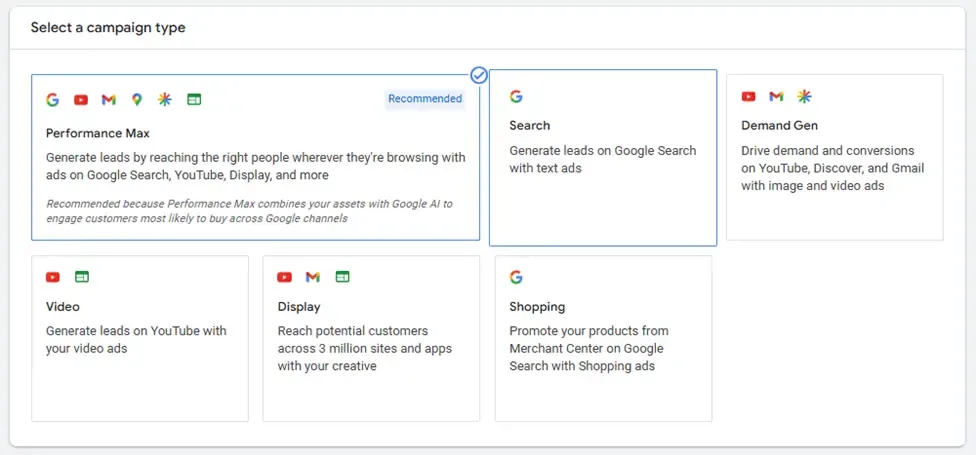
Learn how the different advertising platforms use AI and take advantage of those features.
Also, set your service area carefully, give campaigns a few weeks to learn, and check where leads come from so you know they can convert.
How to use AI for customer communications
How quickly and clearly you respond often decides who gets the job. These ideas help you answer faster and with more context to increase the chance that you land the sale.
Build an AI resource for common questions
Put your service list, pricing rules, policies, service area, and best past replies into one document. Start with the FAQ list you built earlier. Upload it to a ChatGPT Project, Claude Project, or Gemini Gem with this instruction: “Answer only from these files. If the answer isn’t here, say ‘Check with a manager.’”
Share this with whoever answers phones and messages. Each month, add questions that stumped it so answers stay consistent and your staff can handle more situations quickly.
Use AI to answer incoming requests faster
Connect the knowledge document from your staff resource to a website chat or text auto-reply tool. Expand it to include your FAQs and any other common customer needs. Have it answer basic questions, ask two or three qualifying questions—like the service needed, ZIP code, and timeline—then share your booking link.
Use an AI solution like Dash by LocaliQ here. It can manage complex requests as they come in by phone and text, so leads don’t have to wait while you’re busy helping customers.

Quickly summarize conversations and highlight next steps
Speaking of summarizing, you can also use AI to summarize conversations and interactions you have with customers. Where allowed, and with customers’ permission, give your AI tool a transcript of lead qualification calls. You can also record a voice memo after a consultation, site review, etc.
Paste it into AI and ask: “Summarize this in five bullets: what the customer needs, budget, timeline, concerns, and next steps. Then draft a short recap email to the customer.” That’ll make follow-up quick and more productive.
Write and automate personalized follow-ups after sending a quote
After each quote, jot down what the customer cared about, like budget, timing, or a specific worry. Give AI those notes and ask: “Write three short follow-ups. Day two: answer their main concern. Day five: share a similar project or review. Day 10: ask if they’d like to move forward or close the quote.”
You can use the AI summaries from previous conversations here, too. The more context you add, the more personalized and relevant the message will feel.
Load the emails into your CRM or email tool, and make sure the sequence stops when they reply.
Tips for using AI in marketing
There are nearly endless ways to use AI to improve the speed and effectiveness of your marketing. Remember these tips to make AI as useful and safe as possible.
Include the audience in your prompts (where applicable)
The most important person in every message is the receiver. So give your AI some context about the people you’re communicating with.
For example, if you’re repurposing content for social media, mention which of your target audience segments the new posts need to engage.
Ask AI to interview you
Not sure what you need? Ask your AI to interview you and draw out the details of your project.
Here’s an example prompt to get you started:
I want to build [a quote calculator for my landscaping website]. Before you build anything, interview me to figure out what I need. Ask me one question at a time. Cover what it should do, what it shouldn’t do, who will use it, and how it fits into my business. When you have enough, summarize the plan and wait for my OK before building.
Try a few small projects first
If you’re new to using AI for anything bigger than a shopping list, it can be a little intimidating.
Here are a few quick projects to get the feel of it:
- Have your AI review a spreadsheet of data (like anonymized customer characteristics) to see what trends pop up.
- Ask your AI to create a pricing tool for a fictional business. Add more detail and run it again to see how it changes.
- Give your AI one of your existing service or product pages and ask it to recreate it for a different customer type.
Know when not to use it
There are many ways AI can support your growth. But there are also instances where using it can end up hurting your marketing.
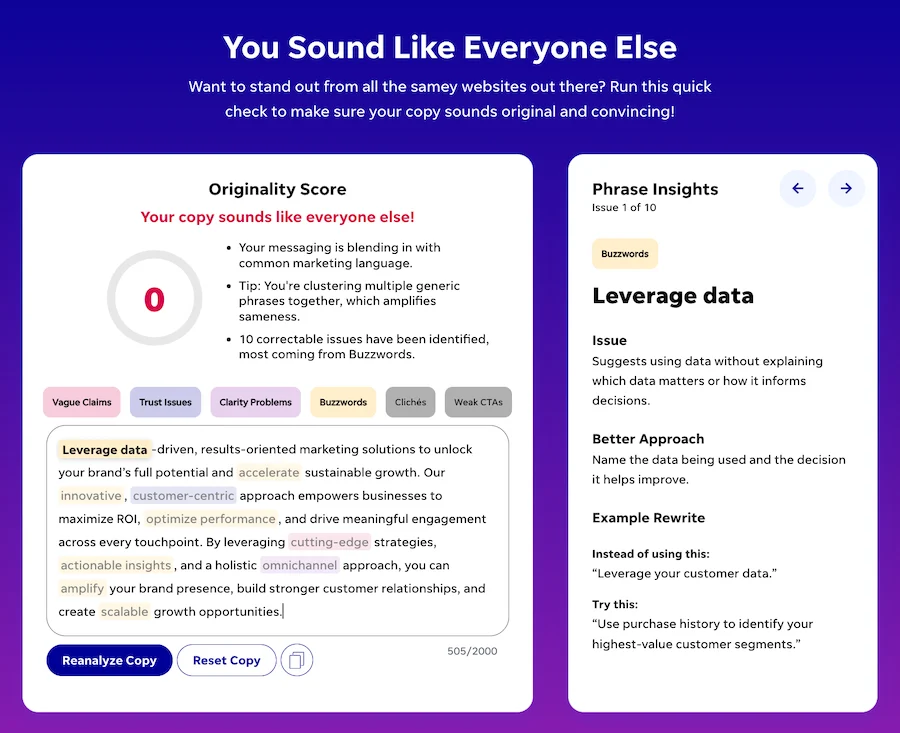
For example, AI has clear writing patterns. If you use it to create copy without editing it, you’ll run the risk of either blending in with everyone else or, worse, damaging your brand.
Sometimes what you write accidentally sounds a little AI-ish. Or it at least blends in instead of standing out. We built a fun copy grader, You Sound Like Everyone Else, to help root out boring phrases.
Trust, but verify
Finally, never assume AI output is 100% correct. It can sound very convincing, but it’s good to remember that it’s a prediction machine. Its job is to make an educated guess at what the next item, image, pixel, etc. should be in a sequence. While it’s gotten much better, it can still guess itself into making up facts or missing key information.
Never let something AI-created out into the world without reviewing it, checking facts, and making sure it suits your brand.
Try using AI in marketing
There are loads of ways to make marketing easier, get leads faster, and even have a little fun by using AI. And the use cases keep growing exponentially.
The two most important points here are to try it and to learn where not to use it. That means experiment often, but keep a human hand guiding customer-facing assets.
If you’d like to know how our AI-powered marketing solutions (and human experts) can help you grow, reach out and we’ll give you a guided tour based on your unique business.

Recommended for you






Unlock your business potential
We offer innovative technology and unparalleled expertise to move your business forward.